
If you are doing newsletters, social media postings, or banner ads, you have probably wondered which channel is really driving traffic and conversions.
The answer to vanishing this query and finding out is through UTM parameters and campaign tracking.
UTM parameters are just tags that you attach to URLs to let Google Analytics 4 (GA4) tell you exactly where your visitors came from. Instead of generic “direct” or “referral” traffic, you can see visits from your newsletter, LinkedIn post, Instagram story, or homepage banner. It’s this clarity that enables smart marketing attribution, better budget decisions, and smarter campaign optimization.
Without proper UTM tagging, your data will be everywhere. You’ll have duplicates, missing sources, and time wasted trying to figure out what worked. Consistent naming conventions (lowercase, clear source/medium/campaign names, etc.) = reliable and actionable GA4 reports.
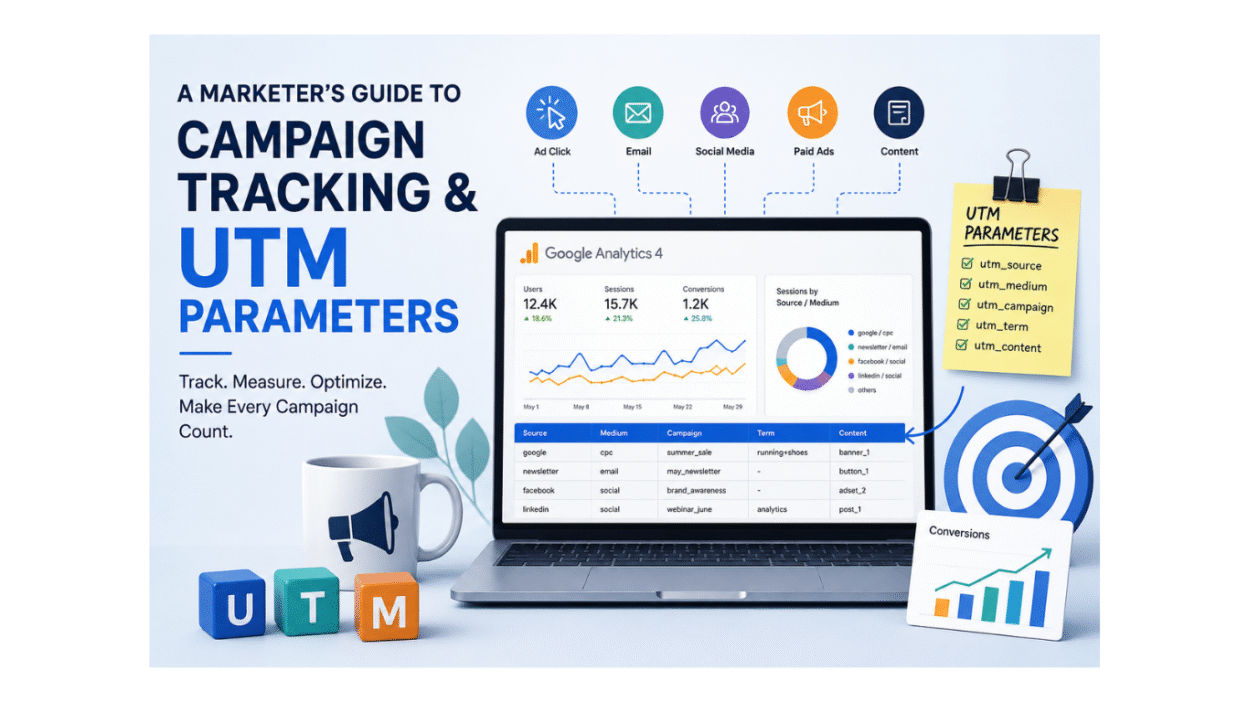
A straightforward, practical guide to help marketers get their campaign tracking and UTM parameters right.
Table of Contents
- What are UTM parameters, and what is their use?
- Core UTM Parameters You Should Use
- Clean Tracking Data Naming Conventions
- Using UTM Parameters in Newsletters, Social Posts and Banners
What are UTM parameters, and what is their use?
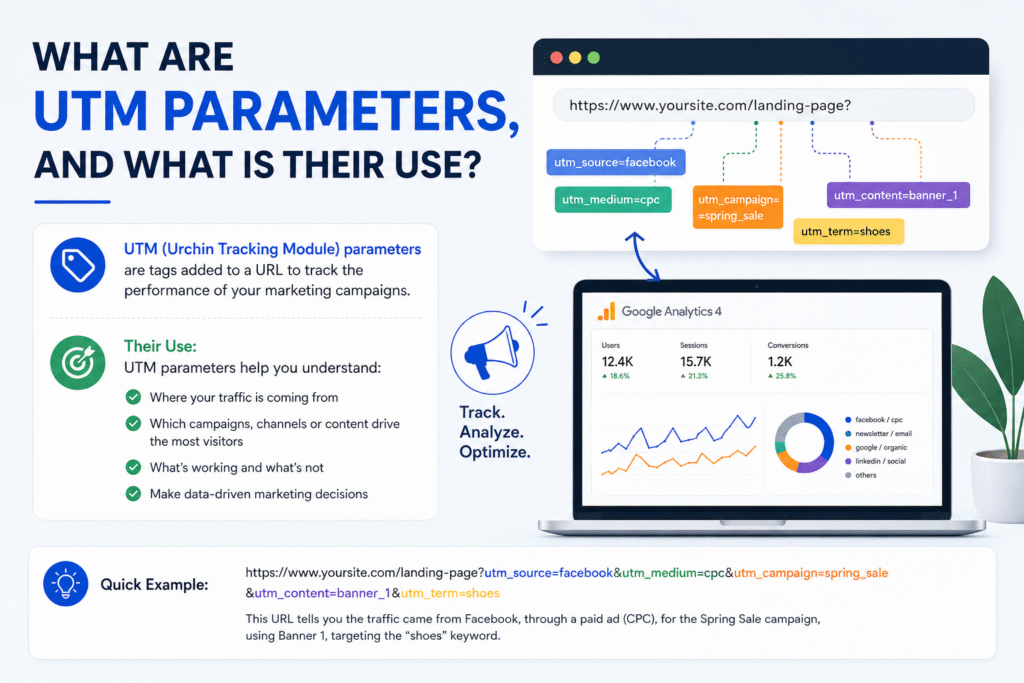
UTM parameters are tiny text tags you add to the URL query string at the end of a URL to tell your analytics tool where the visitor came from. UTM stands for Urchin Tracking Module, the technology that powered the original Urchin software before Google bought it and turned it into Google Analytics. Today, those same tags work just as well in Google Analytics 4 (GA4). Additionally, Google also provides the Campaign URL Builder to create properly tagged URLs.
When a user clicks on a link with UTM parameters, your analytics platform scans those tags and logs facts such as
- Source: Where did the click come from (newsletter, LinkedIn, Instagram)?
- Medium: Type of traffic (e.g. email, organic_social, cpc, display)
- Campaign: The name of the campaign (e.g., spring_sale_2)
This method is the cornerstone of campaign tracking: instead of seeing “some traffic from somewhere,” you see the particular newsletter, social media post, or advertisement that drove visits, engagement, and conversions.
Implications for marketers
Without UTM parameters, a lot of your marketing traffic shows up as direct, referral, or unassigned in GA4. And because of this, it becomes challenging to
- Find out which channels are truly working.
- Get a good comparison of success across social, paid advertisements, and email.
- Put together a good rationale on the specific campaigns/creatives.
- Build reliable marketing reporting and attribution models.
If you’ve set up the correct UTM tagging, you can:
- Identify the most active users for each of the newsletters
- See which social channels and posts are driving actual traffic
- Monitor the performance of particular banners and ad creative elements
- Next, invest with data-driven judgments.
In summary, campaign monitoring and UTM parameters turn imprecise traffic figures into concrete, actionable knowledge about your marketing endeavors. When applied consistently, they offer a trustworthy depiction of each touchpoint’s contribution to your objectives in GA4.
Core UTM Parameters You Should Use
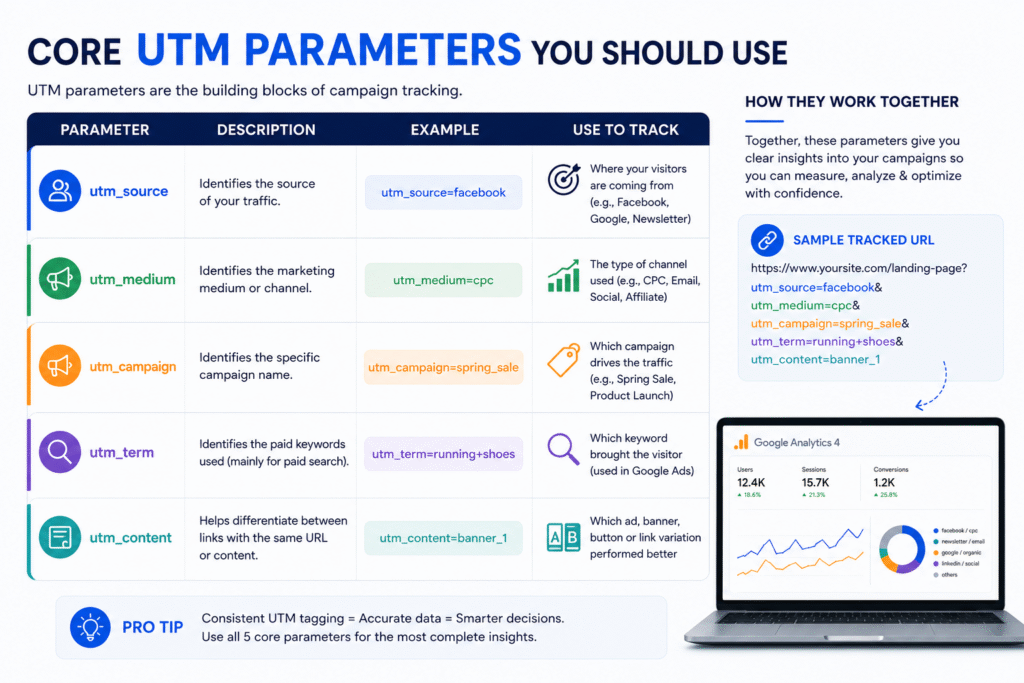
There are five standard UTM parameters, but for dependable campaign monitoring and UTM parameters in most marketing initiatives, you only need three of them. The appropriate set keeps your data clean, your GA4 reports easy, and your team consistent.
The three UTM parameters you should utilize
- Where does the traffic come from
This option defines the referring platform or publisher for visitors to your site.
For example:
- utm_source=newsletter
- utm_source=linkedin
- utm_source=instagrampost
- utm_source=hp_banner
In GA4, the parameter is the Source dimension in reports such as Traffic Acquisition.
- What kind of traffic is this?
The parameter describes the marketing medium or channel type.
Examples:
- utm_medium=email (for newsletters and e-mail marketing)
- utm_medium=organic_social (for posts on organic social media)
- utm_medium=cpc or utm_medium=paid_social (when it comes to paid adverts)
- utm_medium=display (for display advertisements)
This value appears in the Medium dimension in GA4, and it is critical to have it correct in order to group your channels properly.
- Which promo/campaign
This is for that particular campaign or promotion.
Examples:
- utm_campaign=spring_sale_2026
- utm_campaign=may_newsletter_webinar
- utm_campaign=linkedin_followers_increase
In GA4 the parameter is reflected as the Campaign dimension and allows you to compare performance across different marketing campaigns.
These 3 factors are the backbone of campaign tracking. They answer: Which source, through which media, and for which campaign brought this traffic?
(Useful but optional) UTM parameters
If you want more detail, you can include them, but they are not essential for each link.
- What creative or variant
This property differentiates distinct versions of the same ad or link.
The utm_content option is used to distinguish between different versions of the same ad or link, such as
- utm_content=cta_button_top versus utm_content=cta_button_bottom
- utm_content=image_banner_red utm_content=image_banner_blue
- utm_content=read_more_link_text
This is great for A/B testing to evaluate which of your banners or social posts is more effective.
- A keyword (mostly paid search) is:
Popular for paid search terms
Example: utm_term=shoes for running
For newsletters, social media postings, and most banners, utm_term is typically not needed. It’s more relevant for Google Ads and other paid search ads.
How They Function in GA4
These UTM parameters correspond to the major dimensions in Google Analytics 4:
- utm_source -> Source
- utm_medium => Medium type
- utm_campaign ← Campaign Name
- utm_content → Content (used for ad variation or creative usually)
- utm_term → Term (mostly for sponsored search keywords)
If you can tag your traffic consistently with these factors, GA4 can bucket your traffic correctly in the right channels, offer you clear campaign results, and allow you to attribute and report accurately.
For this article, which covers newsletters, social media postings, and banners, you will primarily use utm_source, utm_medium, and utm_campaign. Utilize utm_content when you want to track different creatives or link placements.
Clean Tracking Data Naming Conventions
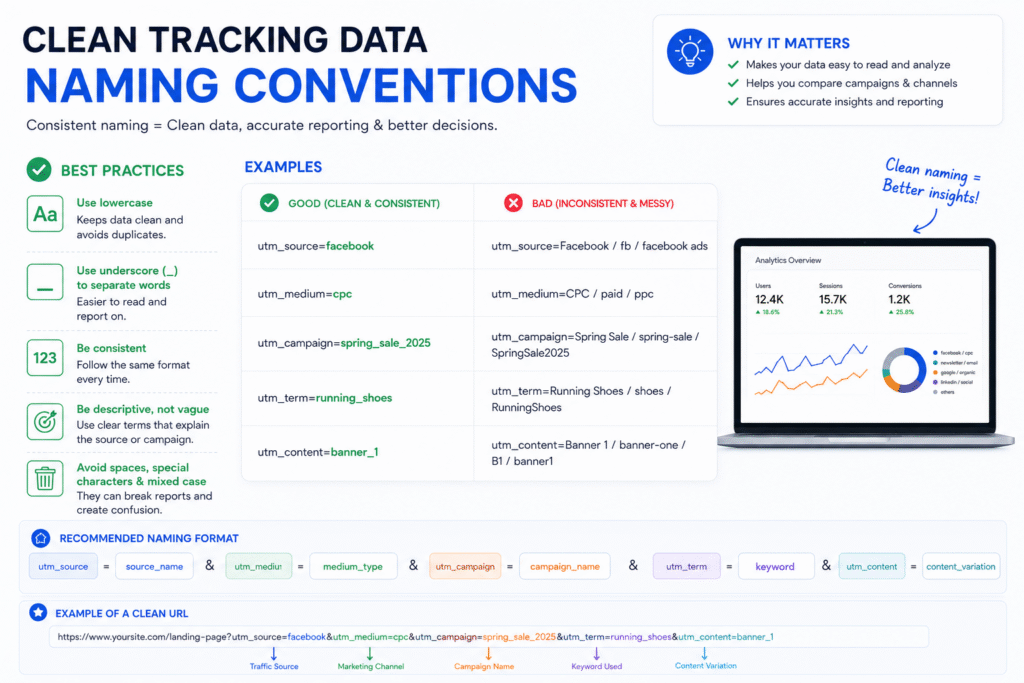
UTM parameters are only effective if your team utilizes them consistently. The largest problem marketers have isn’t missing UTMs; it’s untidy, inconsistent naming that produces duplicate entries and confusing reports in Google Analytics 4 (GA4).
The importance of naming conventions
In GA4, uppercase and lowercase are separate values, which means:
- utm_source=LinkedIn
- utm_source=linkedin
- utm_source=LINKEDIN
All of them are counted as three different sources in GA4 even though they are the same platform. Over time, this method separates your data, inflates the number of rows, and makes campaign tracking look fragmented.
The similar problem occurs with:
- Spaces: utm_source=linkedin_post vs utm_source=linkedin post
- spring_sale_2026, spring-sale-2026, springSale2026
- Campaign titles are inconsistent: SpringSale2026, spring_sale, and spring campaign
All of these cause duplicate rows in your GA4 reports and make it tougher to evaluate performance over time or channels.
Core naming rules to observe
Apply these easy criteria for all your UTM parameters:
- Use lowercase letters always
For instance, instead of “utm_source=LinkedIn” or “utm_source=LINKEDIN,” use “utm_source=linkedin.”
- Be consistent with delimiters
Instead, favor one of these:
- underscores: spring_sale_2024
- Hyphen-spring-sale-2026
Do not include them in the same campaign.
- Avoid spaces and special characters
Keep “utm_campaign=spring_sale_2026” and not “utm_campaign=Spring Sale 2026!”
- Clear but concise
Like, enter in like this “utm_source=newsletter” and not like “utm_source=email_newsletter_from_marketing_team”.
- Employ a shared vocabulary
Make it a team call:
- Newsletter, linkedin, instagram, facebook Which sources should I use?
- Channels to use: organic_social, email, paid_social, display
- Campaign naming: season_offer_year (e.g., spring_sale_2026)
Why Tracking Campaigns and UTM Parameters Are Important
Campaign monitoring and UTM parameters are only effective with consistent name conventions. Without naming conventions:
- Your traffic source data is not uniform.
- You have more than one row for the same source, medium, and campaign.
- Your campaign performance is all over the place.
- Your reports are less readable and more difficult to evaluate.
- Your team wastes more time cleaning data than making decisions.
With some naming conventions:
- Each source, medium, and campaign is listed just once.
- Compare the performance of mailings, social postings, and banners side by side, simply.
- Your GA4 reports are clean, dependable, and ready to act.
Naming conventions are the “grammar” of your UTM strategy. Grammar doesn’t change the meaning, but it makes everything legible and consistent. For marketers, that consistency is what transforms raw data into credible campaign insights.
Using UTM Parameters in Newsletters, Social Posts & Banners
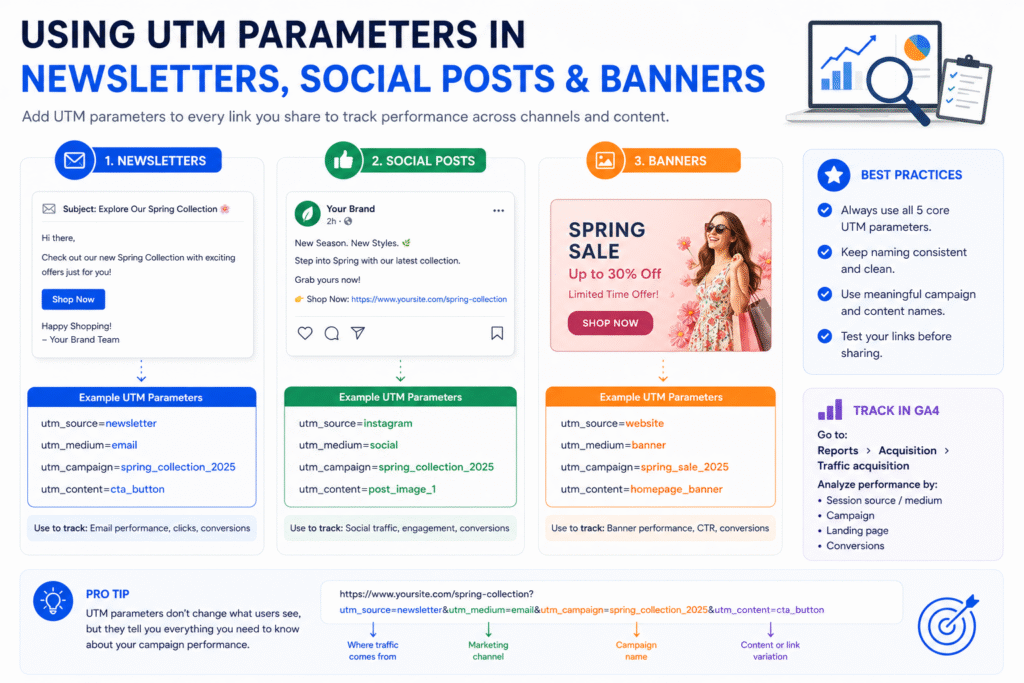
The true benefit of campaign tracking and UTM parameters is when you apply them regularly in your key channels of promotion. The three most essential use cases for this issue are newsletters, social media postings, and banner advertisements.
Newsletters
The standard format for newsletters is simple: the newsletter or email list is the source, email is the medium, and the specific send or offer is the campaign name. It makes it easy to see in GA4 which newsletter was the source of visits and engagement. For example: ?utm_source=newsletter&utm_medium=email&utm_campaign=may_product_update
Adding utm_content makes the procedure much more beneficial if the same newsletter has multiple links; one link could lead to a blog post and the other to a product page, and utm_content lets you distinguish those clicks later on.
Social postings
For social media, keep the source tied back to the platform and the medium tied back to the type of traffic. Then if the post is organic, use a consistent medium like organic_social, or if the post is paid, use a consistent paid medium like paid_social or cpc depending on your reporting structure. For example: ?utm_source=linkedin&utm_medium=organic_social&utm_campaign=campaign_tracking_guide
This allows you to understand which platform is truly driving traffic, rather than placing all social visits into one generic bucket. It also makes it easy to compare performance amongst sites like LinkedIn, Instagram, and Facebook.
Banners
Banners tie the source to the placement/property and use the medium for display/banner traffic. This is especially useful if you have multiple creatives or placements and want to see which one is performing better. For example: ?utm_source=homepage_banner&utm_medium=display&utm_campaign=summer_offer_2026
If you have plenty of variations of a banner, include UTM_content so you can identify the creative, button, or positioning afterward. That way you can compare what people clicked on without guessing.
The easiest rule to follow is the same logic across all channels:
- Source = where the traffic originated.
- Medium = type of traffic.
- Campaign = a particular marketing effort.
- Content = creative or link variation as needed.
This format will keep your data legible and make sure there is no misunderstanding in GA4 reports. It helps you manage your campaign monitoring across newsletters, social media postings, and banners.