
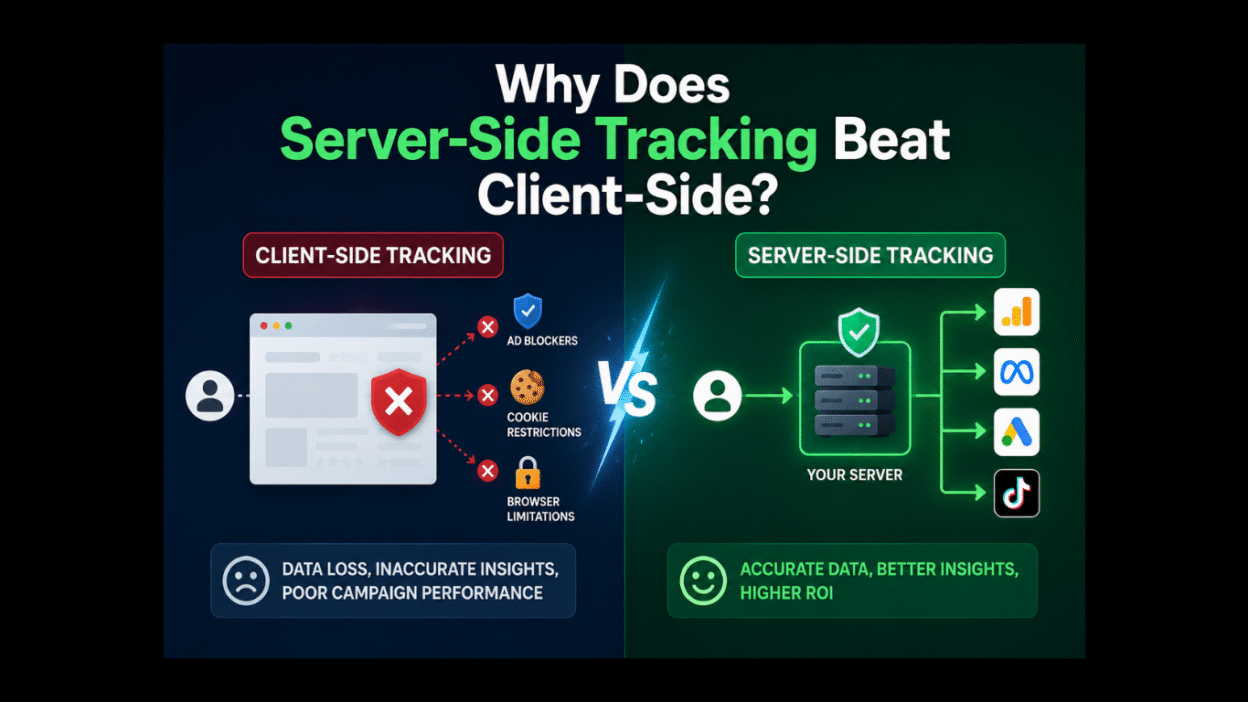
A major part of the website market’s go-to approach is the client-side tracking. The functioning includes running a JavaScript code directly in the user’s browser. To explain this, let’s say Google Tag Manager (GTM) or Universal Analytics tags are firing to capture events like page views, clicks, or purchases. With this process the data can be sent directly from the client’s device to the analytics platforms. These platforms include Google Analytics 4 (GA4) or Meta Pixels; they pull in details such as cookies, referrers, and device information along the way.
Table of Contents
- Introduction
- How Does Client-Side Tracking Work?
- How Does Server-Side Tracking Work?
- Pros and Cons of Client-side Tracking
- Pros and Cons of Server-Side Tracking
- Why Is Client-Side Tracking Becoming Less Reliable?
- Why Is Server-Side Tracking Beneficial?
- Recent Developments (2025-2026)
- Implementation Comparison
- Conclusion and Recommendations
Moving further, if we talk about server-side tracking, it flips the script. In this method, there is no need to rely on the browser; the data will be first routed through your own server. In simple words, when a user interacts with your site, the browser will send a lightweight “ping” to your server. And this “ping” then processes, filters, and forwards enriched events to the tools like GA4 or advertising pixels. For this, you will require a server-side GTM container, which will give you full control before data hits third-party endpoints.
Shifting from client-side to server-side is not just a trend that businesses are following. There are real challenges involved. Hurdles like 40%+ ad blocker rates and regulations such as General Data Protection Regulation (GDPR), California Consumer Privacy Act (CCPA), and India’s Digital Personal Data Protection (DPDP) Act. It is crucial to understand these fundamentals. As you will gain knowledge for why server-side tracking beats client-side in delivering accuracy, speed, and compliance.
How Does Client-Side Tracking Work?
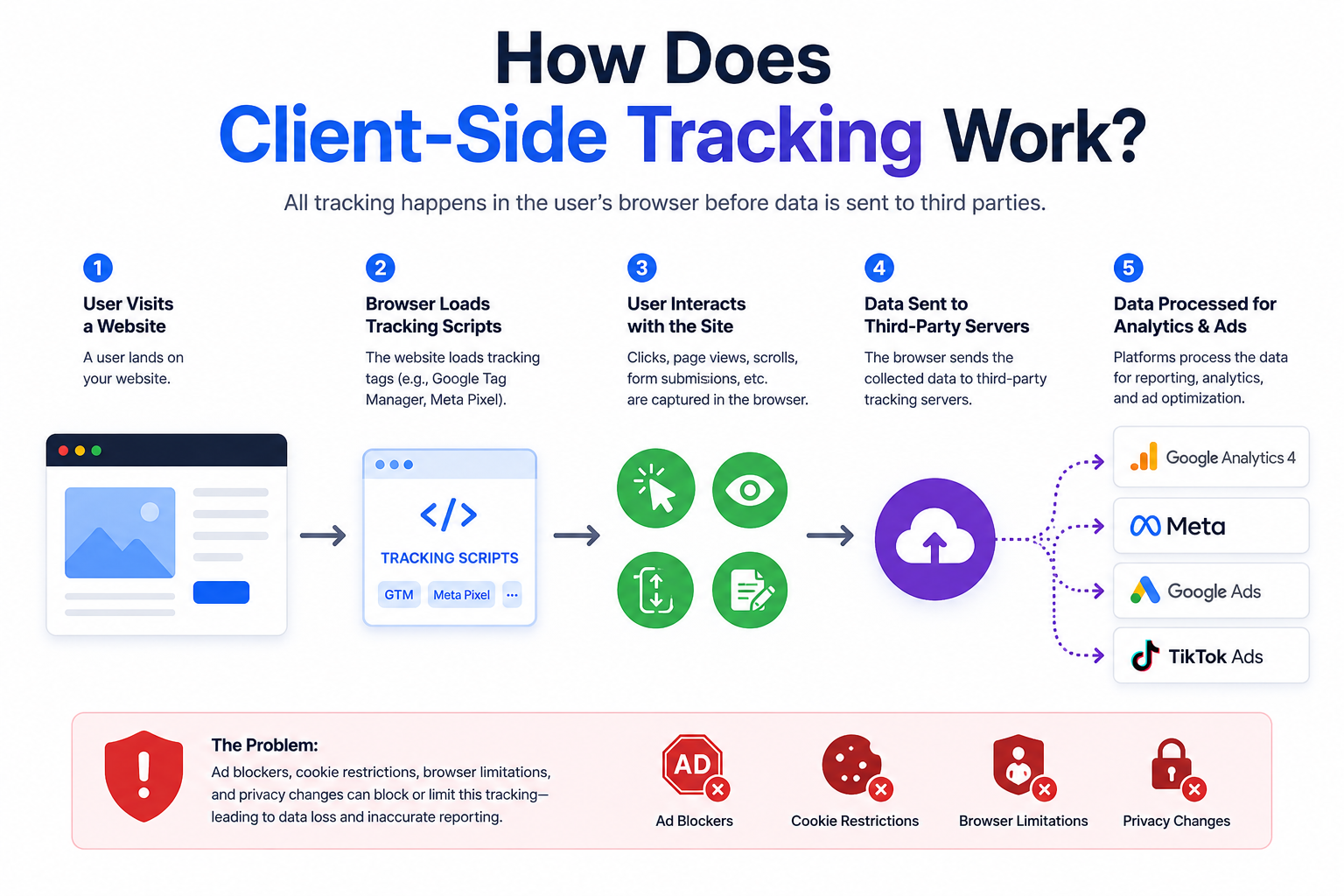
The moment a visitor loads your website, client-side tracking puts on its gears and enters the field. There is a snippet of JavaScript that is embedded in the HTML, and it starts listening for user actions right in their browser. These snippets are often from Google Tag Manager (GTM), GA4 gtag.js, or the Facebook pixel.
Let’s move further and discuss the flow.
How about you yourself trying, or let’s say testing, your website? Now, you wish to buy one product. When you click on the “Buy Now” button or scroll to a product, the code will capture these event details through the customer journey, such as the page URL, user agent, and custom parameters. These are the basic details that are necessary.
Now, after grabbing these details, they are bundled up into an HTTP request that can usually be a GET or a POST to endpoints like google-analytics.com or facebook.com. And this request gets fired off directly from the browser. Tools like Google Tag Manager make it a breeze to work on. You can simply set up triggers and tags in a visual interface, and no server tweaks are needed.
As you might have figured, this approach is known for its simplicity; you can simply copy-paste the code and go live. This approach grabs the rich and real-time context, including screen resolution or referrer sources. And these will be fed straight into the platforms like Google Analytics 4 or Adobe Analytics. However, as we move further and explore, this browser dependency tends to open up doors to common pitfalls in a privacy-first world.
How Does Server-Side Tracking Work?
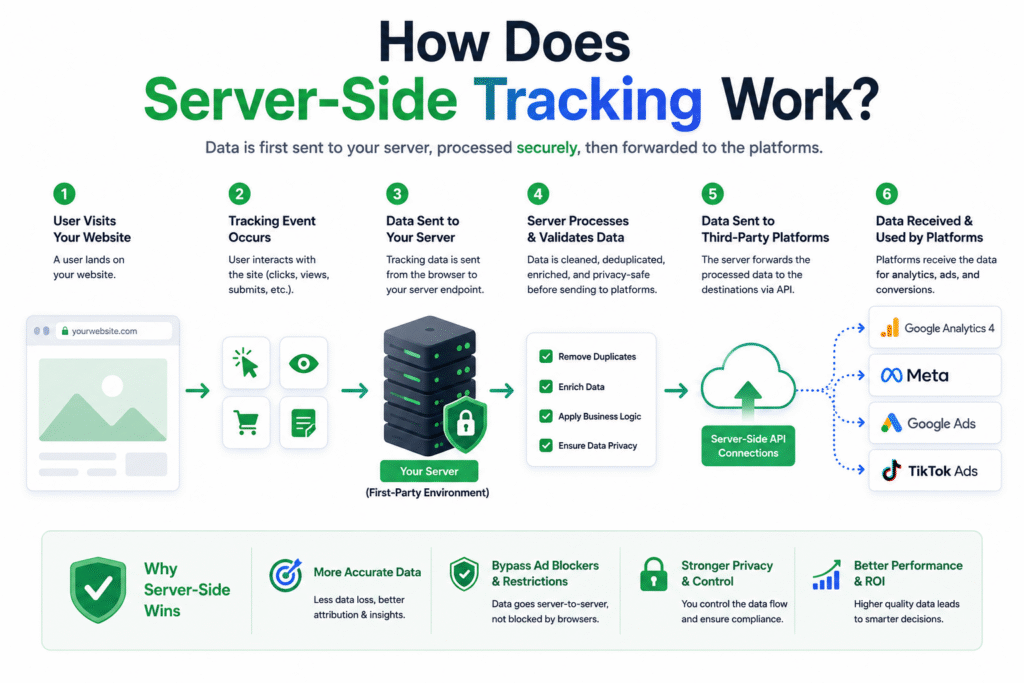
Server-side tracking works initially with a simple signal from the browser, but the real magic happens on your infrastructure. A minimal request is sent by your website by an API; it can often be just an event type and basic parameters. This request is sent to an endpoint on your own server; it can be to a cloud instance running Google Cloud, Amazon Web Services, or a dedicated server-side GTM container.
Once the request is sent, your server takes over the throne. As for Google Analytics 4 implementations, the events are majorly forwarded with the use of Google Analytics Measurement Protocol. Now, the server will authenticate the request and enrich it with server-stored data; you can think of it as user IDs or hashed emails. Then filters will be applied to strip Personally Identifiable Information (PII) for GDPR or DPDP compliance, and it ends with deciding what to forward. Then the cleaned-up events will be proxied to destinations like Google Analytics 4, the Meta Conversions API, or even offline processors. And all of this will be done under first-party domains to dodge blockers.
It is clear that this setup does demand a bit more upfront work. This includes provisioning a server and configuring tags in a server-side Google Tag Manager preview mode. Even after this hassle, it still empowers you to control the entire data pipeline. Additionally, it ensures hits land reliably even if browsers like Chrome phase out third-party cookies by late 2026.
Pros and Cons of Client-Side Tracking
If ease is what you are looking for, client-side tracking will win you over because it’s the quick win for small sites or rapid tests. The tags can be deployed via Google Tag Manager in minutes, all the while capturing detailed browser data like the scroll depth or the outbound click the user has made without even touching the backend code.
Keeping this thought in mind, let’s explore the pros and cons of client-side tracking.
Pros:
- The setup is super simple. You can simply copy-paste the script, and you will be tracking page views or events instantly.
- You will have your hands on n number of device contexts, including grab referrers, screen size, and cookies. And that too effortlessly for segmentation in GA4.
- It will cost you less at the beginning. You will not be needing any servers, which is ideal for startups or low-traffic sites.
Cons:
- Ad blockers tend to kill the server. There are over 40% of users who practice blocking ads and end up losing key events like purchases.
- The biggest headache is privacy. The third-party cookies will face blocks from Safari ITP and Chrome’s 2026 phase-out.
- Kills the speed with time as heavy scripts slow Core Web Vitals, which ends up killing SEO rankings.
Pros and Cons of Server-Side Tracking
Server-side tracking appears as an angel when client-side tracking stumbles. This approach delivers only the reliable data in tough conditions. It does require a rather huge amount of initial effort, comparatively, but the payoff in accuracy and control soothes the hassle for GA4 users and privacy-focused teams.
With this, let’s learn more about the pros and cons.
Pros:
- The accuracy is of great levels. This approach hits a 95-100% delivery rate, which recovers the lost events, like 19% more purchases through Meta CAPI.
- Server-side tracking is the powerhouse of privacy. It uses first-party cookies and filters PII easily for GDPR, CCPA, and DPDP compliance.
- The best part is it boosts the speed. The Bowser load gets lighter, which, in turn, improves Core Web Vitals and site performance scores.
Cons:
- The setup is complex; it needs a server infrastructure and dev time for GTM server-side containers.
- The cost is a bit high, as hosting on AWS or Google Cloud adds up to a monthly fee, a bit high but scalable.
- You must understand the whole approach, as this approach requires backend knowledge beyond basic tag management.
Why Is Client-Side Tracking Becoming Less Reliable?
Now, as we are moving ahead digitally, many reasons are being discovered due to which client-side tracking is losing its support. Let’s look into those reasons:
- Server-side tagging is one of the technologies that helps improve attribution modeling and, at the same point, supports compliance with GDPR and CCPA.
- There are browsers that are tightening their user controls. These include Safari, Firefox, and Google Chrome.
- Traditional tracking methods are being restricted by some privacy frameworks, namely, Intelligent Tracking Prevention (ITP) and Enhanced Tracking Protection (ETP).
- Third-party cookies are being removed gradually, and this is making all the attribution less accurate.
- All the ad blockers nowadays can prevent conversion tracking scripts from firing properly.
- There is a huge increase in the shift of businesses towards first-party strategies and consent mode implementations.
Why Is Server-Side Tracking Beneficial?
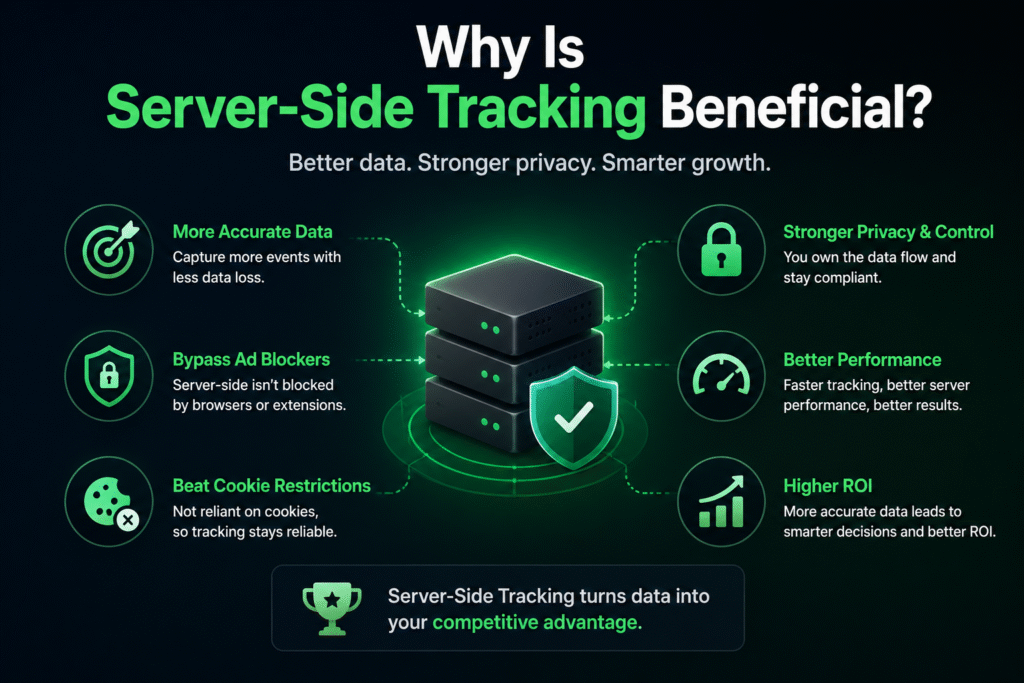
Server-side tracking is not only better for you; it is all the more essential for staying ahead in 2026’s data landscape. With this approach, you will have recovered events that you lost to ad blockers. Which means it will deliver up to 19% more purchase signals to platforms like Meta and Google Ads while directly boosting ad performance and ROI.
Your business will witness real wins. CPAs will be reduced by 13% with AI-powered bidding as you have clean data, and you can track events offline for apps and delayed conversions. The plus point is it future-proofs against Chrome’s third-party cookie demise and the strict rules, like India’s DPDP Act. As a result, you can filter any sensitive data before it leaves your server.
In short, with server-side tracking, you have all the control. Be it accurate insights, faster sites, or compliance, you have everything without compromise. This makes it a clear choice for scaling analytics in GA4, Google Signals, and beyond.
Recent Developments (2025-2026)
Through 2025-2026, server-side tracking saw major levels of changes for good. And all this happened because of Chrome’s cookie phase-out and GA4’s server-side tagging updates. There was a 300% growth in implementation witnessed in tools like Stape and JENTIS, as all the agencies were seeking out this opportunity and winning pitches by promising 20-30% data lift.
There are a few key advancements:
- A stronger integration like BigQuery
- Bounteous’s privacy-first analytics stacks
- Integrating AI for event deduplication
- Market reports that are projecting a $2B+ server-side software sector by 2033.
Furthermore, there are new tools like Didomi’s 2026 server-side tagging suite; this tool tends to emphasize consent mode v2 compliance. While Cometly on the other hand highlights 15-25% of ROAS gains for e-commerce.
The hybrid setups were accelerated by India’s DPDP Act enforcement. They focused on blending client-side and server-side tracking for apps through React Native WebView tracking. Making it perfect for GA4 mobile accuracy.
Implementation Comparison
The better way to understand this is via a table.
| Aspect | Client-Side | Server-Side |
| Tools | GTM Web Container | GTM Server Container and Cloud Hosting |
| Setup Time | Minutes | 1-4 weeks |
| Cost | Free | $50-500/month |
| Hybrid Option | N/A | Client captures, server proxies |
The perfect start would be with hybrid. You should use GTM to send to your server endpoint, and then you should migrate fully for high-value sites. Don’t forget to test in preview mode to match the GA4 data parity.
Conclusion and Recommendation
Server-side tracking has achieved a great level of success, completely covering the modern analytics standards. This approach benefits your server by outweighing the setup hurdles for any business that is serious about the ROI and user trust. Be it running GA4 on a WordPress site or tracking React Native apps, you will have:
- 95%+ data accuracy
- Ad blocker immunity
- Built-in compliance
So, when is the right time to choose server-side?
If you wish to gain high-traffic e-commerce, lead-gen sites, or apps where every conversion counts, server-side is your go-to.
If you are new to this, simply start with a hybrid model. Do not ignore the client-side; keep it for quick insights while piping key events, including purchases and signups, via your server to GA4 and Meta CAPI. Migration will be straightforward if you use tools like server-side GTM, as they often pay for themselves with your recovered revenue in weeks.
Actions that you must take:
- Do audit your GA4 data loss from the blockers by checking DebugView discrepancies.
- For your GTM server container, provision a Google Cloud or AWS instance.
- Remember to test with purchase events first and expect a 15-20% uplift immediately.
- If your team is India-based, you must prioritize DPDP consent filtering in order to stay compliant.
Hence, server-side is the modern future. Save your insights and don’t let browsers steal them. You must take control today and watch your campaigns thrive in 2026 and beyond.